

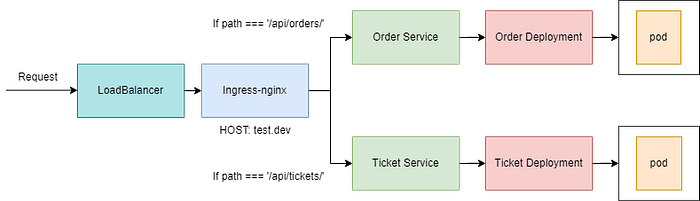

Hello, In this article we ‘re going to take a look at kubernetes ingress nginx controller.
Ingress is a solution that provide us to direct external traffic to kubernetes services in the cluster.
Ingress nginx controller works on layer 7 that means it gives us a opportunity to do path based routing. If we don’t use ingress, we need to use a separate loadbalancer for each application, which is difficult to manage, which is another part that makes ingress beautiful.
If you want to know how ingress works, you can check: https://kubernetes.io/docs/concepts/services-networking/ingress/
To install ingress nginx controller, please go here: https://kubernetes.github.io/ingress-nginx/deploy/
When you install ingress-nginx, it creates a namespace to put objects that are created by it. Nginx is actually an application which should be running in the cluster. Thats why it deploys a deployment object.
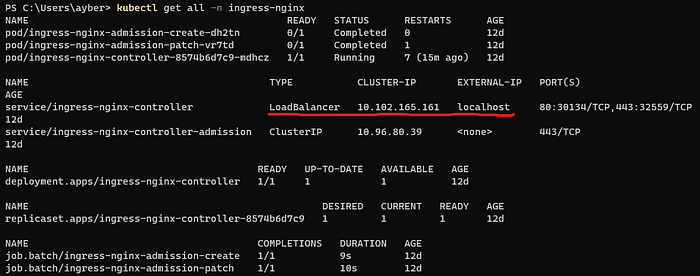
Objects that are created by ingress-nginx
As you can see, ingress-nginx-controller creates a loadBalancer service that listens localhost 80 and 443 ports.
If you have installed the nginx ingress controller, lets start. If we look at the example architecture above, we need to create deployments and services first.
Note: The images for the containers are just express applications that listens port 3000 which is not a big deal. Ticket app has get router for “/api/tickets/” and Order app has get router for “/api/orders/” and both response with simple ‘hello from <app-name>’.
Creating deployment and service objects for both ticket and order app;
apiVersion: apps/v1
kind: Deployment
metadata:
  name: ticket-depl
spec:
  replicas: 1
  selector:
    matchLabels:
      app: ticket
  template:
    metadata:
      labels:
        app: ticket
    spec:
      containers:
        - name: ticket
          image: ayberkdd/ticket

---
apiVersion: v1
kind: Service
metadata:
  name: ticket-srv
spec:
  selector:
    app: ticket
  ports:
    - name: ticket
      protocol: TCP
      port: 3000
      targetPort: 3000

---

apiVersion: apps/v1
kind: Deployment
metadata:
  name: order-depl
spec:
  selector:
    matchLabels:
      app: order
  template:
    metadata:
      labels:
        app: order
    spec:
      containers:
      - name: order
        image: ayberkdd/order
---
apiVersion: v1
kind: Service
metadata:
  name: order-srv
spec:
  selector:
    app: order
  ports:
  - name: order
    protocol: TCP
    port: 3000
    targetPort: 3000
kubectl apply -f depl.yamlCreating ingress;
apiVersion: networking.k8s.io/v1
kind: Ingress
metadata:
  name: ingress-service
  annotations:
    kubernetes.io/ingress.class: nginx
spec:
  rules:
    - host: test.dev
      http:
        paths:
          - path: /api/tickets
            pathType: Prefix
            backend:
              service:
                name: ticket-srv
                port:
                  number: 3000
          - path: /api/orders
            pathType: Prefix
            backend:
              service:
                name: order-srv
                port:
                  number: 3000
kubectl apply -f ingress-srv.yamlThe host in the rules section is important, because you can host multiple domains inside one single kubernetes cluster. So that’s what this host property all about.
Cause of that specific domain property in the file, we can not reach the applications just by typing localhost on the browser. To access them, we are going to use a trick. So in other words, whenever we try to connect test.dev, it ‘ll connect to localhost rather than the real test.dev domain that is probably exist somewhere on the internet thanks to our trick.
To apply that trick, we ‘ll change the hosts configuration file inside our machine.
Locations for the host configuration file depending on OS;
Windows: C:\Windows\System32\Drivers\hosts
Mac&Linux: /etc/hosts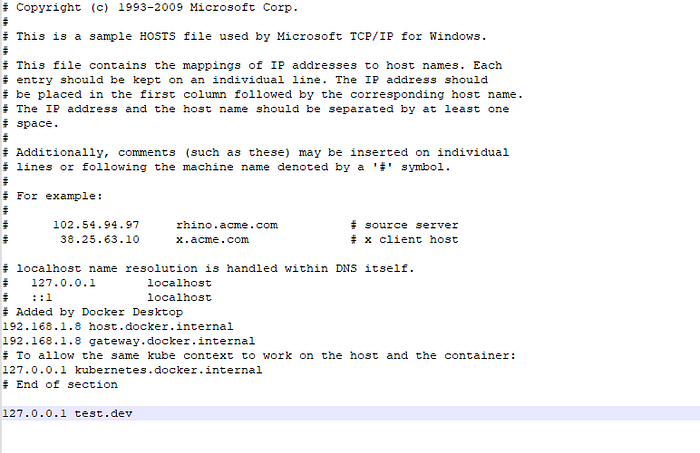
Add a definition for test.dev that is binded to localhost ip
Quick note: If you are using minikube, you should use your minikube ip instead of 127.0.0.1 (To learn your minikube ip, just type ‘minikube ip’ to your terminal)
So lets try, open the browser and try to go test.dev/api/tickets and test.dev/api/orders
If you see NOT SAFE page. Just type ‘thisisunsafe’ somewhere on the browser.
I hope its worked. Thanks for your precious time. See you in the next article 🙂